
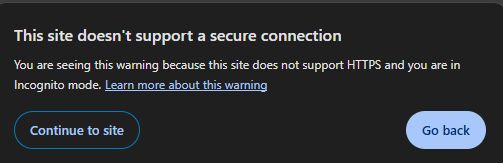
I was talking to a possible new website management client in Tullamore and I explained to him that Google were giving his site a warning, that it might be unsafe. He was shocked and asked why was this. I explained that his site had not https. He did not know what this was, and asked what is https? so I explained to him. I thought I would do a blog post for my readers to also know what is https.
When you visit a website and look at the top left. You might see a “not secure sign”  this shows that are not using HTTPS.
Https does a lot of heavy lifting behind the scenes.
Let’s break it down in plain terms.
First, what is HTTPS?
HTTPS stands for HyperText Transfer Protocol Secure.
HTTP, is the system your browser uses to talk to websites. The S at the end of Http stand for secure, hence https.
So you can get onto my site by typing https://donaldold.com
The difference between Https and Http
HTTPS encrypts the data sent between your browser and the website.
Without it, anyone on the network could potentially see what you’re doing. With it, your data is scrambled and protected.
The core idea: encryption
Think of encryption like sending a sealed letter instead of an open letter.
- HTTP = sending a postcard anyone can read
- HTTPS = sending a sealed letter
Only the website has the key to open the letter.
What actually happens when you visit a site?
Here’s an explanation of what goes on when you go to an HTTPS website:
You login to your browser
You type in a URL like https://donaldold.com.
Your browser sends a request to the website’s server
The server sends back a certificate
The website responds with something called an SSL certificate.
This certificate:
- Proves the website is who it claims to be
- Contains a public encryption key
It’s like showing an official ID card.
3. Your browser checks the certificate
Your browser verifies:
- Is this certificate valid?
- Is it issued by a trusted authority?
- Does it match the website?
If something’s wrong, you’ll see a warning page.
They agree on a secret key
Once the certificate checks out, your browser and the server create a shared secret key.
They do this using a clever method where:
- The server shares a public key
- The browser uses it to safely send a secret
No one else can figure out that secret, even if they’re watching.
5. Encrypted communication begins
Now everything sent between your browser and the website is encrypted using that shared key.
This includes:
- Passwords
- Credit card numbers
- Messages
- Page content
Even if someone intercepts the data, it looks like random noise.
Here’s why HTTPS is so important:
Privacy
No one can easily see what you’re doing online.
Security
It protects sensitive data like logins and payment details.
Trust
That padlock icon reassures users that the site is legitimate.
Data Secure
It prevents attackers from altering the data being sent.
What about HTTP?
HTTP still exists, but it’s not secure.
If a site uses HTTP:
- Data is sent in plain text
- It’s vulnerable to interception
- Browsers may gave a warning about the website as not secure

That’s why most modern websites use HTTPS by default.
A quick example
Imagine buying petrol:
- HTTP: You shout your card details to the cashier, across a crowded shop.
- HTTPS: You key in only your pin numbers in the machine, hiding the pin number .
Same details, very different level of privacy.
Final thoughts
If your a website owner, HTTPS isn’t something you have to think about every day.
Its an annual payment to have your site secure.
If your an internet user, you should only go on sites that are secure.
The HTTPS, protects your data, verifies websites, and keeps your online activity secure.